


I’ve been using Claude’s paid version for a while now, and it’s become one of the AI tools I rely on the most. But as much as I enjoy using it, I’m equally particular about my privacy. While setting up the app and changing a few things here and there, I came across a handful of options that made me stop and think.
Some were enabled by default, when I’d rather have them turned off, while others were features I felt were worth switching on, depending on how you use Claude day to day. After spending time tweaking these settings to suit my needs, I’m convinced they’re worth reviewing rather than leaving everything as-is. If you use Claude regularly, its Settings menu deserves a closer look than you might think.

Everything Claude Pro subscribers can do that most people never try
The message cap is the least interesting reason to pay for Pro.
Claude, stop following me around
The answers only convinced me to switch it off
While exploring Claude’s privacy settings, one option immediately caught my attention: Location Metadata. I was fairly certain I didn’t need Claude to know my location, yet the setting was enabled by default. To be fair, Claude is transparent about why it collects this information, stating that location data can be used to improve certain product experiences. Before switching it off, though, I wanted to understand exactly what that meant, so I dug into the Learn More section.
After reading through the explanation, I felt even more comfortable disabling it. Claude explains that when you use features that benefit from location data, such as requesting nearby recommendations or local information, it may use your IP address to determine your approximate location at the city or regional level. That means queries like “Find a coffee shop near me” or “What’s the weather like today?” can be answered based on where you are.
That makes perfect sense for people who regularly use Claude for local searches. The thing is, I don’t. If I’m looking for a nearby café, directions, or weather updates, I almost always turn to Google Search or Maps instead. Since location-aware responses aren’t something I personally rely on Claude for, keeping Location Metadata enabled didn’t offer much value to me. If you feel the same way, here’s how you can turn it off:
- Open the Claude app on your phone or computer.
- Tap your profile icon, then tap Settings.
- Select Privacy.
- Under Preferences, find Location Metadata and toggle it off.
Even if you decide to leave it enabled, understanding what it does and whether you actually benefit from it is always a good idea.
Our chats are off the clock
Thanks for asking, but that’s a no

Right below the Location Metadata toggle, I stumbled upon another setting that caught my attention immediately. Claude has a feature called Help Improve Claude, enabled by default, that uses your conversations toimprove the service. My reaction was thanks, but no thanks.
It’s not that I use Claude to discuss deeply personal secrets or anything particularly sensitive. In fact, a lot of my conversations are work-related. But that’s exactly why I’m not comfortable with the idea of my chats being used for training purposes. Whether it’s personal notes, research, drafts, or work conversations, I’d rather keep that data between me and the AI I’m using.
So, after turning off Location Metadata, I also switched off Help Improve Claude. For me, it was about having control over where my data goes and how it’s used. If you feel the same way, this is another setting worth checking.
For your eyes (and Claude's) only
Claude has its own version, and it's worth knowing about

Now, I know plenty of people turn to Claude for things they’d rather not share elsewhere. Maybe it’s personal thoughts, sensitive questions, work-related discussions, or simply conversations they’d prefer to keep separate from their regular chat history. No judgment here — everyone uses AI differently.
If you fall into that camp, I’d strongly recommend checking out Incognito mode. It’s designed for those moments when you want an extra layer of separation between a conversation and your usual Claude activity.
The good news is that enabling it takes just a second. Open a new chat in Claude and click the Incognito icon in the top-right corner. Once you do, you can start chatting in Incognito mode. Even if you don’t use it every day, it’s one of those features that’s worth knowing about. You may not need it often, but when you do, you’ll be glad it’s there.

6 Reasons I Use Claude Instead of ChatGPT
ChatGPT is great; don't get me wrong. But Claude is so much better.
Please remember me, Claude
Memory saves me from explaining everything twice
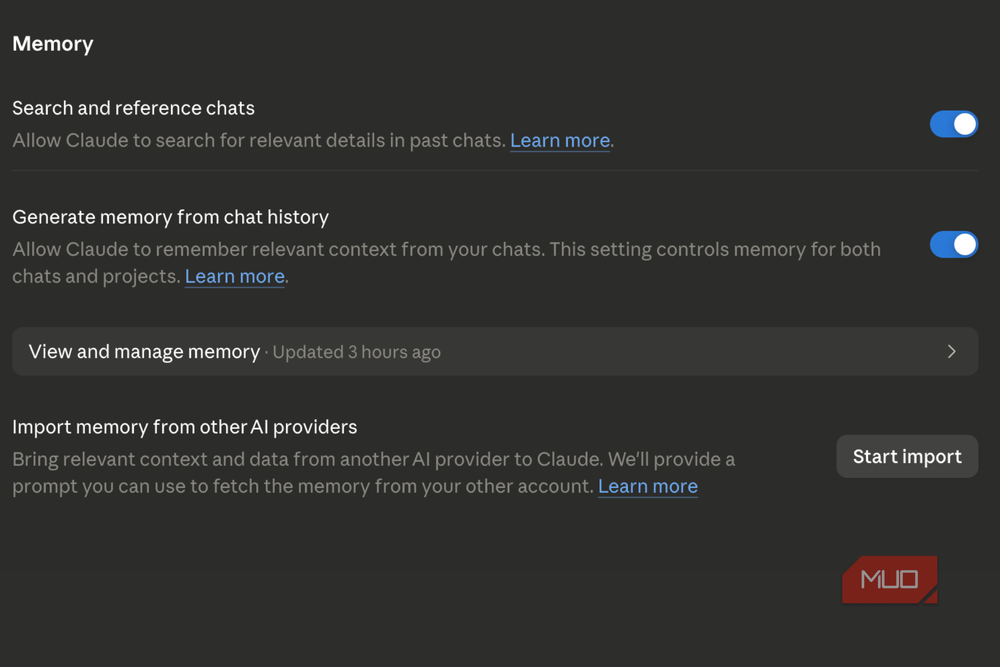
Unlike the privacy settings I switched off, this is one feature I actually keep enabled. In fact, it might be the most useful setting in Claude for the way I use it. I know plenty of people would rather an AI not remember anything about their past conversations, and that’s completely fair. If you mainly use Claude for one-off questions or occasional chats, turning memory off probably makes a lot of sense.
For me, though, it’s the opposite. I use Claude regularly, often for the same kinds of tasks: researching projects and workflows. Having it remember context means I don’t have to start from scratch every single time. Instead of repeatedly explaining my preferences, the tone I like, or how I want something structured, Claude can pick up where we left off.
Of course, this is one of those settings that comes down entirely to personal preference. What works for me may not work for you. If you’d rather keep your conversations from contributing to Claude’s memory, you can easily switch the feature off. Here’s how:
- Open Claude and go to Settings.
- Select Capabilities.
- Under Preferences, find Generate memory from chat history.
- Turn the toggle off.
This is probably the one setting on this list without a right or wrong answer. It simply depends on whether you want Claude to remember you or meet you as a stranger every time you start a new chat.

Claude
- Developer
- Anthropic PBC
- Price model
- Free, subscription available
Claude is an advanced artificial intelligence assistant developed by Anthropic. Built on Constitutional AI principles, it excels at complex reasoning, sophisticated writing, and professional-grade coding assistance.
Making Claude work on my terms
I've spent a lot of time using Claude and experimenting with nearly every feature it offers, and at this point, it's easily one of my favorite AI tools. At the same time, I'm someone who pays close attention to privacy settings. Not because I have something to hide, but because I like knowing what information I'm sharing and why. Taking a few minutes to review and adjust those settings to match my preferences gives me much more confidence in the tools I rely on every day.
What I appreciate most is that Claude actually puts many of these decisions in your hands. It lets you decide how much data you want to share, which features you want enabled, and how you want the service to work for you. That level of control isn't something every app gets right, and it's one of the reasons I enjoy using Claude as much as I do.