


Before your phone ever loads a page, it sends out a request to translate the site's name into an address it can actually use. That request travels in plain text, completely exposed to your carrier, your internet provider, and anyone watching the local network. Luckily, you can close it on both Android and iOS without installing anything complicated, and that's where DNS protection starts.
There is a privacy hole in every default network connection
Even with HTTPS, every site you visit is visible in plain text

Every time you pull out your phone and open an app or type in a website, a lot happens behind the scenes that you probably never think about. The internet doesn't understand words like google.com; computers only understand numbers.
So before your phone can connect to anything, it has to ask a DNS server to translate that human-readable name into a numerical address it can actually use. This happens automatically, without you doing a thing. And in almost every case, the network you're using decides which DNS server handles that translation.
Unfortunately, that translation request moves across the network in plain text. It is completely unencrypted and readable by anyone who wants to look. Most people know that HTTPS keeps your actual web browsing private, and that's true. However, the lookup that happens before any of that, the part where your phone asks "where is this website", has no protection. It goes out in the open.
In practice, this means that your carrier, your internet provider, and anyone else monitoring the network can see every domain name you try to visit. That's how companies collect your data. They're not seeing the content of what you're reading, but the destination gives a lot away.
The operator of a public Wi-Fi network, or even someone nearby with the right tools, can watch your requests go by and piece together a pretty specific picture of your habits, interests, and daily routine.
That information is valuable to marketing companies. A shiny padlock icon in your browser won't change the fact that your destination is already exposed before the secure connection even starts.
This is all completely legal and standard practice. You're not going to avoid it without actively trying to. Unfortunately, some people may take this further and use it to their advantage illegally. So it's best to protect yourself as much as possible.
How to force encrypted DNS on Android and iOS
Both platforms support this natively; they just don't make it obvious
Protecting your privacy online doesn't mean you have to run everything through a VPN. Plenty of commercials claim it's the only way to protect yourself, but that is completely untrue.
VPNs can chew through your battery and slow your phone down, and you should never trust free ones, since they end up costing you money. A great way to keep yourself secure for free is by adding encryption directly to your DNS requests.
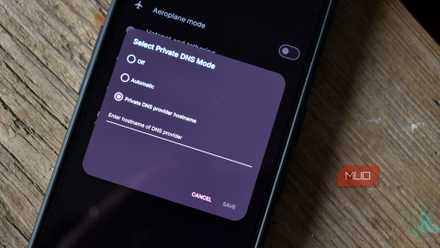
If you're on Android 9 or later, the setup is pretty easy. Head into Network & Internet in your settings and look for the Private DNS option. By default, it may be set to automatic, but you can switch it to manual and enter the address of a secure DNS provider.
one.one.one.one points your traffic through Cloudflare; dns.quad9.net sends it through Quad9. These are safe places. Once that's saved, Android pushes all DNS traffic through an encrypted tunnel on port 853, regardless of which app or browser is making the request.
It is one.one.one.one, not 1.1.1.1; it is an easy mistake to make, but if it doesn't work, make sure you've spelled out the numbers.
This keeps anyone else from seeing the sites you look up.
You get the same protection on iPhone and iPad, just through a slightly different process. Instead of a simple settings toggle, you need to install a configuration profile, which is usually a small .mobileconfig file like NextDNS, you download through Safari from your DNS provider of choice.
Once you've downloaded it, go to VPN & Device Management in your settings to install and activate it. After that, iOS automatically routes all your DNS lookups through the encrypted connection on both Wi-Fi and cellular, even when no app is running in the background.
DNS is not your only tools
VPN always comes up in these conversations

None of this is to say that DNS is your last stop or all you have to do. It is a great way to keep you safe, but there is more you can do. VPNs are not as good as they are in commercials, but they are still helpful.
A VPN works differently from DNS, and they are great partners. Instead of just protecting one part of your connection, it hides everything your device sends. It is encrypted and routed through a remote server.
Websites see the server's location, not yours, which is how VPNs hide your IP and let you appear to be somewhere you're not. It's a good way to keep sites from profiling you, but it won't help much if you log in to those same accounts anyway.
If you don't want to go further, you don't have to. Since encrypted DNS only handles that small initial lookup, it's genuinely lightweight. So you won't notice slower speeds, added latency, or your battery draining faster, the way you might with a VPN running constantly in the background.
For everyday use, like stopping your ISP from profiling your browsing habits or blocking ad trackers at the network level, it works well and stays out of your way. It's all you need. However, if you want to go a step further, get a paid VPN subscription.
DNS is your only way out
Encrypted DNS is one of the few privacy changes that costs you nothing in speed or battery life, which makes it hard to argue against turning it on. It is just there to stop your carrier and any local network from logging every domain your phone looks up, which is a more detailed record of your habits than most people realize they're handing over. For the average person who isn't running from sophisticated surveillance, this one change in settings can really make a difference.

NordVPN
- Logging policy
- Audited no-logs
- Mobile app
- Android, iOS
NordVPN is a top-tier service known for its high speeds and robust security. It features a verified no-logs policy, Double VPN encryption, and built-in malware protection. With over 9,000 servers, it’s ideal for bypassing geo-blocks on streaming sites while keeping up to ten devices secure simultaneously.