


Most privacy settings promise a grand transformation, yet they barely change how you use the internet. You tick a box, install a browser extension, switch to a "private" search engine that protects your personal information, feel a little better about yourself, and then carry on exactly as before. A lot of it feels like rearranging furniture in a room nobody was watching.
Then I turned on Windows 11's DNS over HTTPS (DoH) setting almost as an afterthought, expecting the same underwhelming result. What I found instead was more interesting than a simple "on/off" privacy win.
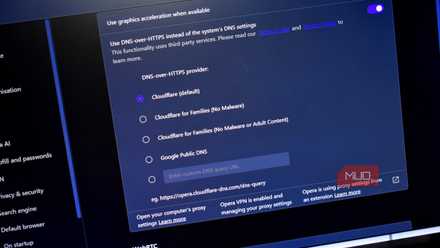
I turned off three browser defaults, and my ISP suddenly couldn't track my web history anymore
It only takes a few switches and your privacy goes through the roof.
Every website starts with a confession
And my ISP was taking notes the whole time

Before any page loads, my computer has to ask a question: which address belongs to this name? Typing a URL into a browser doesn't connect to anything on its own. The browser hands that name to a DNS resolver, which translates it into a numeric IP address, and only then does the actual connection happen, the same way I'd look up a number before dialing it. That translation step is a DNS query, and on most home networks, it defaults to whatever resolver the ISP hands out.
I knew DNS existed in some vague, textbook sense. What hadn't really landed for me is that this query usually travels in plain text. Classic DNS is typically sent unencrypted over port 53, making it easily visible to anything monitoring that part of the network. Plain text means readable, not just theoretically interceptable — your ISP can see every site you visit because they can see the domain you just asked for, along with enough metadata to tie that lookup to your connection.
Now, don't assume that the little padlock icon in your browser covers this. It doesn't, because the DNS lookup happens before that padlock ever shows up. Say you check a job board on your lunch break, or a health forum, or a niche site while comparing mortgage lenders; every one of those lookups leaves a clean, readable entry in your ISP's logs, regardless of whether the page itself eventually loaded over HTTPS.
What encryption actually buys you here
Spoiler, it's privacy, not a disappearing act
Turning DoH on in Windows 11 does not require a third-party app or a registry hack. DoH support first arrived in Windows 10 Insider builds around mid-2020 (Build 19628), but it never made it to stable Windows 10 in any clean form. Windows 11 is where it became reliably accessible through the standard Settings UI.
Here's the actual process:
- Open Settings with Win+I and head to Network & Internet
- Click your active connection, Wi-Fi or Ethernet
- Click Hardware properties
- Find DNS server assignment and click Edit
- Switch the dropdown from Automatic (DHCP) to Manual
- Toggle IPv4 on and enter a resolver, Cloudflare's 1.1.1.1 as preferred and 1.0.0.1 as alternate, or Google's 8.8.8.8 and 8.8.4.4
- Set the DNS over HTTPS dropdown to On (automatic template)
- Repeat for IPv6 if you want full coverage, then save
After saving, the resolver listed on that page should show Encrypted next to it, which is your actual confirmation that the setting is doing something rather than sitting there configured and ignored. You also need to check that your browser settings aren't overriding your operating system's DNS changes, since browsers like Chrome and Firefox manage their own DNS settings independently.
Mechanically, what's happening now is that your device tucks the same DNS question into an ordinary HTTPS request and sends it to the resolver over port 443. This is the same port that almost every website already uses (which is also why that traffic blends right in with normal browsing rather than standing out).
Now, you haven't eliminated DNS surveillance; you've relocated it. Before, your ISP's resolver saw every domain you queried. Now, Cloudflare's or Google's resolver does instead. You've traded one set of eyes for another. That trade can be worth making — Cloudflare's 1.1.1.1 has a strong published privacy policy, with query logs purged within 24 hours and no data sold to advertisers — but it's a trust decision you're making, not a trust problem you're escaping. If you're uncomfortable with either company seeing your DNS traffic, there are self-hosted and independent resolver options, though they come with more setup overhead.
Your ISP can still see that your PC is talking to Cloudflare's or Google's resolver; the IP address gives that much away immediately. What it can no longer easily read is which domain you asked about during that conversation.
That's a meaningful improvement, but it's nowhere near making your browsing invisible. The same connection that loads a website still exposes the hostname through a field called Server Name Indication (SNI), unless both ends support a newer protection called Encrypted Client Hello (ECH) — which plenty of sites still don't.
Your ISP also still sees the destination IP address for every site you reach, and unless that address is shared among thousands of others behind a CDN (Content Delivery Network), it can narrow things down quickly on its own.
Free upgrades this clean don't come around often
For a typical home setup, there's not much reason not to do this. Browsing hasn't slowed down for me — though I'll caveat that resolver speed depends heavily on your location and your ISP's infrastructure, so "faster" isn't a guarantee — just what I noticed.
The one catch is compatibility: some corporate networks and security appliances still expect plain DNS. They can misbehave when a device insists on encryption, which is presumably why Windows offers a fallback mode that prefers encryption rather than demanding it everywhere on every network. So, if you're on a managed work laptop, check with IT before you flip this.
Browsers have been pushing in this direction for years now, and most major platforms now ship some flavor of encrypted DNS support out of the box rather than treating it as a power-user feature. This doesn't make encrypted DNS revolutionary; charitably, it's the internet catching up to something that should have been standard a decade ago.