


Ask a smartphone expert how to purchase your next phone, and they'll often return a single answer: buy it unlocked. As someone who buys multiple phones each year and tests many more, that advice generally holds true. If you upgrade sooner than three years or have a tendency to break your devices, buying a locked smartphone on a carrier installment plan can leave you stuck with a hefty bill when you get a new one early.
Risks aside, I understand why locked devices and carrier installment plans are so popular. If you do the math, take care of your devices, and know what you're getting into, they can be a way to get a flagship phone at a fraction of the price. However, they come with restrictions beyond the obvious one — you can't use locked devices on other cell networks. Buy a locked device without understanding all of them, and you may be disappointed when your phone doesn't work as it should.
You should lock your SIM card before someone else does
Protect yourself against SIM swapping and more security threats by setting up a SIM PIN right now.
Personal hotspot becomes pay to play
I can tether my devices for free using unlocked devices
The most frustrating limitation of carrier-locked devices is using a restricted personal hotspot. Tethering allows you to extend your phone's mobile data to a laptop or other device over Wi-Fi, Bluetooth, or USB. Carriers want you to pay for the privilege, and buying a locked device allows them to restrict how you use your personal hotspot.
This restriction comes as a shock to Android users who get to use a mobile hotspot that can re-share either their cellular data or current Wi-Fi connection. It applies to iPhone users, too. Any phone with a carrier lock might have a hotspot that is blocked completely, or one with speeds that are throttled based on usage. To use a personal hotspot on a locked device, you need to have the right mobile plan from your carrier — and this usually costs more.
This foldable hides 6 5G antennas, and my downloads finally feel fast
I couldn't believe how fast the Razr Fold felt — until I remembered it's using innovative 5G tech.
Bloatware and carrier updates are the default
You can uninstall some of the bloat, but it might come back
The way cellular carriers impose restrictions on their locked devices is through custom software. Some of the software tweaks made by a cellular carrier you can see, and others you can't. Bloatware apps fall into the former category. When you buy a locked device, you'll likely find pre-installed carrier apps and other bloatware from companies that have paid your carrier to ship them on your smartphone. Many of these apps can be easily removed, but there's a catch.
When you buy a carrier-locked Android phone, your cellular company is partially responsible for delivering updates. These updates may re-install bloatware apps from your carrier, even after you've previously removed them. To make matters worse, some carrier bloatware apps cannot be uninstalled without manually using the Android Debug Bridge — they can only be disabled.
The downside to buying a carrier-locked device is that you don't control which apps are installed on your device, and it's a big one.
You're probably ignoring these 6 bloatware apps on your Android phone
If you have these pre-installed bloatware apps on your phone, it's really time to remove them.
Carriers might even block Developer options
Cricket Wireless and AT&T are a few of the culprits

In a surprising twist, some cellular carriers block Android's Developer options menu on locked devices. The logic here seems to be that Developer options can be used to thwart some of the other carrier-imposed restrictions. So, by blocking Developer options entirely, carriers can "protect" their locked devices. In reality, there are many innocuous uses for Android developer settings that don't involve trying to circumvent carrier restrictions.
For instance, there are audio settings buried in Developer options that allow you to select an audio codec, disable absolute volume, or enable HD Audio. They have nothing to do with personal hotspot restrictions or bloatware apps, but you can't use them if you have a locked phone and the wrong carrier.
While this article outlines possible restrictions for carrier-locked devices, not every cellular carrier imposes the same limits. Check with your carrier before buying a locked phone to see what device restrictions come with it.
For example, devices on Cricket Wireless have a complex lock system that blocks Developer options for certain models. If you have a Cricket or Motorola phone on this network, you might not be able to use Android's Developer options suite, which is certainly a bummer.
6 Android developer options that are actually useful for non-developers
Practical Android tweaks hidden inside the developer menu.
If your phone is locked, do you really own it?
Not until it's fully paid off and the carrier lock is removed

There's no easy answer to whether carrier-locked devices are worth it. They come with serious restrictions, and you should be aware of them before making a years-long commitment. However, cellular carriers do subsidize the cost of locked devices with incredible trade-in deals and promotions. You can buy a phone at full price at the time of purchase to get it unlocked with zero restrictions, or save money and agree to the terms.
It's up to you, but understand that carrier-locked devices have more restrictions than merely which cell network it can connect to.
-

Google Pixel 10
- Brand
- SoC
- Tensor G5
- Display
- 6.3" Actua display
- RAM
- 12 GB
- Storage
- 128 GB, 256 GB
- Battery
- 4970 mAh
Google's flagship smartphone, the Google Pixel 10 features the Tensor G5 processor, an outstanding triple-camera system, and seven years of software updates. This is a phone you can rely on for years to come.
-
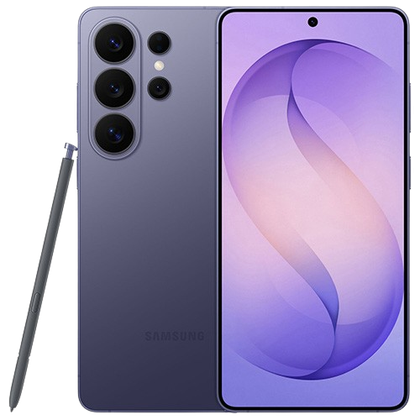
Samsung Galaxy S26 Ultra
- SoC
- Snapdragon 8 Elite Gen 5
- Display
- 6.9-inch Dynamic Super AMOLED 2X
- RAM
- 12 or 16 GB
- Storage
- 256GB, 512GB, or 1TB
- Battery
- 5,000 mAh
- Operating System
- Android
The Samsung Galaxy S26 Ultra isn't a massive leap in specs compared to the previous generation Samsung Galaxy S25 Ultra, but it boasts improvements in every aspect. There's a new Snapdragon 8 Elite Gen 5 chip, fresh camera hardware, and an all-new Privacy Display.

