

Introduction
The GamerCard is a fascinating concept that combines the affordability of a Raspberry Pi with the portability of a handheld gaming device. However, its hardware issues and lack of user-friendly features make it a challenging product to recommend.
Design and Specifications
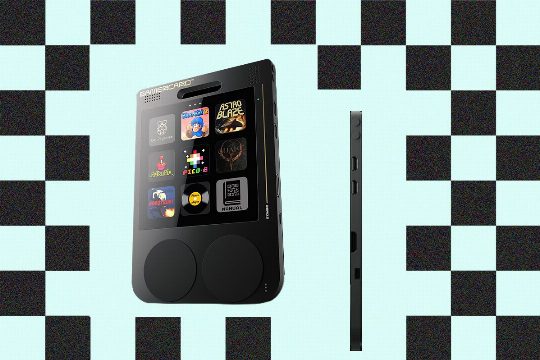
The GamerCard is a small, versatile portable gaming device, designed to be both accessible for impulse shoppers and advanced enough for power users. It features a 4-inch IPS screen, control inputs, and speakers all on the motherboard, along with a 1,600-mAh battery. Despite its slim design, it offers a comprehensive array of ports, including one USB-C, two Micro-USB, a mini HDMI-out, and a Qwiic connector.
Operating System and User Experience
The operating system is tailored to its square screen, displaying games and apps in a three-by-three grid. It comes with a handful of games installed, including platformer Bloo Kid 2, arcade shoot-’em-up Astro Blaze, and the Saboteur trilogy of stealth action games. The online store is still in beta, offering a mix of indie, open source, and shareware games, plus a few apps such as a music player and a Linux terminal emulator. It’s all smart, clean, and refreshingly minimalist, with no ads or distractions.
Control and User Interface
The control inputs are somewhat unconventional, with what look like trackpads on the front actually covering four discrete inputs on each side. The lack of a connected D-pad on the left makes moving around any game world a chore. There’s noticeable lag between press and response, and the controls are stiff and unresponsive. The only way to move in 3D games is to press each direction manually, which makes even slower 2D games annoying to play. Clunky controls also make basic tasks like entering your Wi-Fi password an absolute slog, and the silicone pads begin to show wear almost immediately, collecting fingerprints and retaining impressions of the buttons underneath.
Emulation Capabilities
The greatest potential of the GamerCard lies in its emulation capabilities. The Raspberry Pi community has a huge emu scene, and a version of RetroPie is already available for the GamerCard, supporting a huge assortment of retro and arcade platforms. However, the lack of an easy way to load ROMs onto the device is a significant issue. The only way to do so is by using a file transfer protocol (FTP) client, FileZilla, to send the ROMs to the device over the home network. Once loaded, games do look fantastic, especially pixel art titles in their original dimensions, but the problem with emulation in general, on any platform, is that performance and compatibility can vary wildly.
Conclusion
The GamerCard has potential as a full computer in and of itself, but its hardware issues and lack of user-friendly features make it a challenging product to recommend. It’s a potential gem in the retro gaming market, but the current design and user experience leave much to be desired.
Comments