
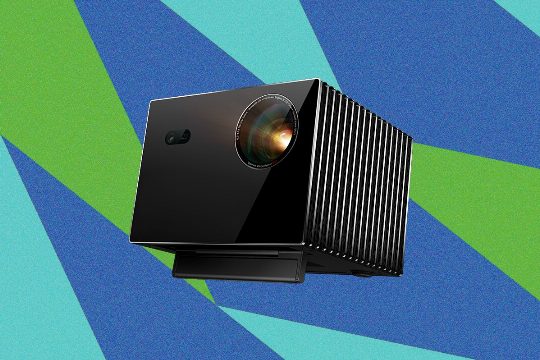
The Valerion VisionMaster Max 4K is a high-end projector that combines the best of both worlds: it's designed for both casual use and more sophisticated setups. Its compact design and built-in Google TV make it an excellent choice for those who want a projector that can be easily integrated into their living room, while its advanced features and high-quality image processing ensure a cinematic experience in darker environments. Here are some standout features and recommendations to consider when choosing a projector like the VisionMaster Max 4K for your home cinema setup.
Standout Features
- Advanced Image Processing: The VisionMaster Max features a proprietary six-stage iris system that dynamically adjusts the aperture to enhance black levels, ensuring that dark scenes are deep and rich. This is a standout feature that sets it apart from other projectors in its price range. It also includes Enhanced Black Level (EBL) technology, which electronically reduces laser output in darker scenes, maintaining detail and contrast.
- Optical Zoom and Vertical Lens Shift: The projector's optical zoom and vertical lens shift capabilities allow for precise image resizing and positioning without the need for digital correction. This is particularly useful for those who want to create a cinematic experience on a large screen without the hassle of moving the projector around.
Recommendations
- Choose the Right Screen Size: The VisionMaster Max is designed to project images up to 300 inches. If you have a large wall or ceiling space, consider the screen size and throw distance to ensure you get the best picture quality. For a 90-inch screen, you can expect a throw distance of approximately 10 feet, depending on your room's ambient light conditions.
- Consider Your Viewing Environment: The VisionMaster Max is designed to handle bright environments, but it's not ideal for extremely dark rooms. If you plan to use it in a room with ambient light, make sure to adjust the image settings to compensate for the brightness. This will help maintain the projector's color accuracy and contrast.
Actionable Tips
- Calibrate Your Projector: Proper calibration is crucial for achieving the best picture quality. Use the projector's built-in calibration tools or invest in a professional calibration service to ensure that your projector is set up correctly for your room's conditions.
- Keep Your Room Dark: While the VisionMaster Max is designed to handle bright environments, a dark room will yield the best results. Use blackout curtains or blinds to minimize ambient light, and consider using a projector screen to further enhance the picture quality.
- Experiment with HDR: The VisionMaster Max supports High Dynamic Range (HDR) content, which can significantly enhance the overall viewing experience. Experiment with different HDR settings to find the perfect balance for your room and projector setup.
the Valerion VisionMaster Max 4K is a powerful and versatile projector that offers a unique blend of features. By considering its standout capabilities and following these recommendations and actionable tips, you can ensure that you get the best possible home cinema experience with this projector.