

Introduction
The Logitech Yeti 2 represents a substantial evolution from the original Blue Yeti, introducing a host of new features and improvements to the home recording ecosystem. This comprehensive guide delves into the Yeti 2's design, functionality, and performance, providing insights for both experienced users and newcomers to home recording.
Design and Build Quality
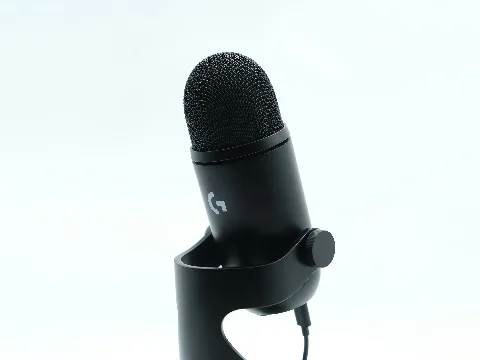
The Yeti 2 maintains the familiar shape and aesthetic of its predecessor, but introduces several notable enhancements. The most striking difference is the addition of a built-in screen and dial, which allows for real-time adjustments without the need for external software. This feature is particularly useful for on-the-fly adjustments and monitoring audio quality. The screen can display various metrics, including a gain-adjusted input volume graph and a volume histogram, providing immediate feedback on audio levels. Additionally, the screen supports customizable avatars and settings, enhancing its utility as a control interface.
Audio Quality and Features
One of the Yeti 2's standout features is its automatic gain control (AGC) system, which automatically adjusts the microphone's sensitivity based on the user's proximity. This system is highly effective, requiring minimal manual intervention. The Yeti 2 also includes several post-processing features, such as de-noise functions with four levels, five EQ presets, and a pattern customizer with eight default options. These settings can be adjusted using the built-in screen or through the Logitech G Hub application, offering a flexible and customizable audio experience.
Connectivity and Compatibility
The Yeti 2 supports a variety of connection protocols, including USB and XLR, making it compatible with a wide range of recording devices. The microphone's compact design and lightweight construction ensure it can be easily integrated into various setups, whether used with a stand or mounted on a boom arm. The included stand features rubber grommets and a felt panel to minimize external noise, while the microphone's long length can be accommodated with a boom arm.
User Experience and Customization
The Yeti 2's intuitive design and user-friendly interface make it accessible to both novice and experienced users. The built-in screen and dial provide instant access to essential settings, while the customizable avatars and settings allow for personalized control. The microphone's automatic gain control system ensures consistent audio quality, reducing the need for manual adjustments. The Logitech G Hub application offers additional customization options and detailed explanations of each feature, providing a comprehensive control panel for the Yeti 2.
Conclusion
The Logitech Yeti 2 represents a significant upgrade to the home recording market, offering a blend of advanced features and user-friendly design. Its automatic gain control system, customizable screen interface, and compatibility with various connection protocols make it an excellent choice for both casual and professional users. Whether used with a stand or a boom arm, the Yeti 2 delivers high-quality audio with minimal effort, making it a standout choice in the microphone market.
Comments