
Introduction to MagSafe and Qi2 Wireless Charging Systems
MagSafe and Qi2 are wireless charging technologies that have transformed the way we charge our smartphones. These systems utilize precise magnet layouts to align the charging coils, ensuring a secure and efficient connection. However, their primary weakness lies in the alignment of the charging coils, which can lead to inconsistent charging performance. This guide will explore how to mitigate these alignment issues and enhance your wireless charging experience.
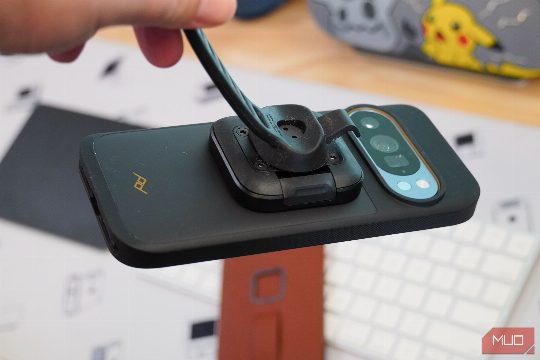
Understanding the Alignment Problem
The alignment problem with MagSafe and Qi2 arises from the need to precisely position the charging coils. If the coils are not aligned correctly, the phone may not receive full power, leading to slower charging speeds or even no charging at all. This issue can be particularly problematic when using these systems with accessories such as stands, wallets, and mounts.
Choosing the Right Mount Accessories
To address the alignment problem, it is crucial to choose mount accessories that are specifically designed for MagSafe and Qi2 systems. These accessories are engineered to ensure proper alignment of the charging coils, thereby maximizing the efficiency of your wireless charging setup. Here are some key features to look for in mount accessories:
- Magnetic Alignment: Look for accessories that feature magnetic alignment mechanisms. These mechanisms help ensure that the phone and the charging coil are properly aligned, even when the phone is in a different orientation.
- Adjustable Mounts: Choose mounts that offer adjustable positioning. This flexibility allows you to position your phone in a way that optimizes the alignment of the charging coils, regardless of the phone's orientation.
- Compatibility: Ensure that the mount accessories are compatible with both MagSafe and Qi2 systems. This compatibility is essential for a seamless and efficient wireless charging experience.
Installing and Using MagSafe and Qi2 Mount Accessories
Once you have selected the appropriate mount accessories, the next step is to install and use them effectively. Here are the steps to follow:
- Position the Mount: Place the mount in a location where it can securely hold your phone. Make sure the mount is stable and won't move while charging.
- Align the Charging Coil: Use the magnetic alignment mechanism to ensure that the charging coil is properly aligned with the phone. This step is crucial for optimal charging performance.
- Secure the Phone: Once the alignment is correct, secure the phone in place using the mount's locking mechanism. This step is important to prevent the phone from moving during charging.
- Test the Setup: After securing the phone, test the wireless charging setup to ensure that the charging coil is correctly aligned and the phone is receiving full power.
Conclusion
By choosing the right mount accessories for your MagSafe and Qi2 wireless charging systems, you can significantly improve the alignment of the charging coils and enhance your overall wireless charging experience. This guide has provided you with the necessary information to make the most of these technologies and ensure that your phone receives the optimal power during charging. Whether you are using stands, wallets, or mounts, these mount accessories will help you achieve a more efficient and reliable wireless charging experience.
Tags
- MagSafe
- Qi2
- Wireless Charging
- Mount Accessories
- Alignment
- Efficiency