
When it comes to RAM performance, one of the biggest tech tips for PC owners is to enable XMP/EXPO profiles in the BIOS to use the manufacturer-intended clock speeds. However, most guides overlook the fact that there can be more than one XMP/EXPO profile, and selecting the wrong one might cost you performance. Your RAM runs slower than advertised by default, and each profile offers different voltage, speed, and timing configurations. Here are some standout recommendations and actionable tips for setting up your XMP profiles effectively.
Your RAM Runs Slower by Default
RAM usually doesn't run at its advertised speed out of the box because JEDEC-compliant profiles are the default. These are the standardized baseline speeds that every board runs unless you enable a faster profile. To reach the rated speeds, enable XMP/EXPO, manufacturer-approved overclocking profiles that are safe to use. For example, if you buy a DDR5 memory kit capable of running at 6,400 MT/s, but the default JEDEC profile sets it to 4,800 MT/s, your memory won't run at 6,400 MT/s unless you change it manually.
Your RAM Stores More Than One Profile
RAM sticks have a microchip inside called SPD (Serial Presence Detect) that stores different profiles: JEDEC (default) and XMP/EXPO (overclocked). Since there are multiple XMP/EXPO profiles, each one has different voltage, speed, and timing configurations. A RAM stick's performance depends on more than just clock speed, and since the CPU constantly requests data from the RAM, latency plays just as big a part as bandwidth. On the other hand, higher voltages help keep signals stable at higher clock speeds, and timing settings specify the number of clock cycles before data is sent to the CPU. Together, these three major specs determine a RAM's performance. Each XMP/EXPO profile offers different clock speeds, voltages, and timings to suit different needs. DDR4 kits usually have two profiles, and DDR5 kits can have up to five (on XMP 3.0 only), two of which are user-writable. At higher clock speeds, RAM becomes more complex, and DDR5 includes additional specifications: VDDQ, which determines the supply voltage for RAM's I/O, and VPP, the internal voltage supply used to activate a row of memory cells.
Setting Up Your XMP Profiles
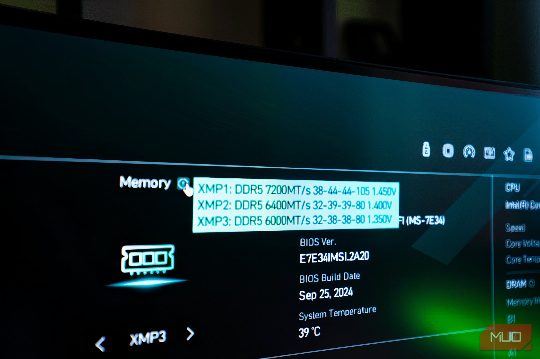
If you're setting up XMP/EXPO for the first time, you may ask: what do these profiles mean? Different profiles set different configurations for different needs. Standard memory configuration/JEDEC speeds is the default profile, and XMP/EXPO 1 (called AEMP on ASUS motherboards) loads the rated speeds with extra tuning and optimizations from the motherboard. XMP/EXPO 2 (called AEMP on ASUS motherboards) is the complete default profile from the manufacturer without the motherboard tuning. An experimental ASUS profile with the same clock speeds but tighter sub-timings than the original XMP/EXPO profile. Might not be supported across all kits or CPUs. Set Profile 1 to run your RAM at its rated speed. Profile 2 is an alternative to Profile 1 (which may sometimes have slower clock speeds), while Profile 3 is experimental. Some boards may even include two additional user-configurable profiles for those who prefer manual overclocking.
How CAS Latency Offsets Clock Speed
Higher clock speeds come with several caveats, the first being latency. Each kit has a CAS latency (CL), the delay before the RAM returns data. As we move up memory generations, CL increases numerically, and DDR5 typically ranges from CL28 to CL46, meaning the RAM takes 28 or 46 clock cycles to start returning data. Since DDR transfers data two bits at a time, a CL46 RAM would take 46 clock cycles to return 16 bits of data. Understanding these settings and how they interact can help you make the best choice for your system.