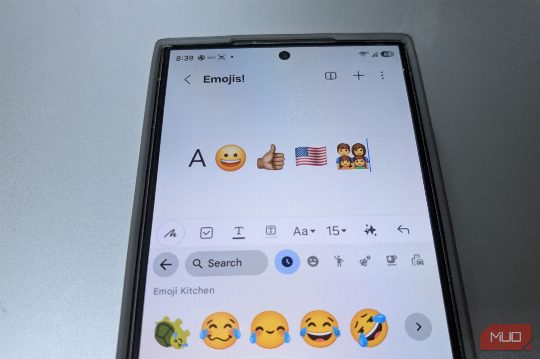
Type the letter A into a message, then add 👨👩👧👦 next to it. To you, that’s two characters. To your phone, it’s a much bigger job. The A is one Unicode code point and takes a single byte in UTF-8. The family emoji is seven code points stitched together, three invisible joiners holding four separate people in place, and it takes 25 bytes. Your screen still draws it as one tidy little family. And that’s before skin tones, flags, and symbols that can flip between plain text and emoji. Behind that blinking cursor, there’s a lot of paperwork. A letter can be one number while an emoji can be several. Your phone doesn't save a tiny picture every time you type 😀. Computers need a common way to agree that an A is an A whether you send it from a Galaxy phone, an iPhone, or a laptop. That's where Unicode comes in. We've covered how Unicode does the heavy lifting behind online text before, but in short, characters are assigned numerical identifiers called code points. Capital A is U+0041. The grinning face 😀 is U+1F600. That U+ notation simply means you're looking at a Unicode code point, with the number written in hexadecimal. Already, that clears up one common misconception. A standard emoji isn't usually a miniature PNG tucked into your text. 😀 is text data, just as A is. Your phone later uses an emoji font and rendering system to decide what U+1F600 should look like. The difference becomes clearer when those code points have to be encoded into bytes. UTF-8, which is widely used for files, websites, and data interchange, uses a variable number of bytes depending on the code point. A takes one byte in UTF-8. 😀 takes four. If the US flag doesn’t appear properly on your device, you may see two letter-like symbols, boxes, or another fallback instead. That’s because 🇺🇸 is actually two regional indicator code points, U+1F1FA and U+1F1F8, which a supported font and rendering system combines into one flag. Those are UTF-8 sizes, not universal storage costs. An app might use UTF-16 or another representation internally, so your phone won't necessarily devote exactly 25 bytes to that family emoji wherever it appears. UTF-8 just makes the difference easy to see. Letters can get complicated too. Take the é in “café.” It can be represented as the single code point U+00E9, or as an ordinary e followed by U+0301, a combining acute accent. They can look identical on screen even though their underlying code-point sequences differ. That’s where Unicode normalization comes in. It gives software standardized ways to convert canonically equivalent sequences into consistent forms before comparing or processing them. Applications that handle this properly can treat both versions of “café” as equivalent even though they arrived there differently. That's one reason tools for typing accented letters and special characters on a Mac do more than add a little visual flair to ordinary text. Some emoji are tiny Unicode group projects. That one symbol may have several characters hiding under it. Start with 👍. Simple enough, right? Now add a medium skin tone, and you get 👍🏽, but your phone didn’t swap in a brand-new picture. It glued two characters together: U+1F44D (the thumbs up) and U+1F3FD, a modifier that says “make it this shade.” It gets downright weird with family or career emoji. Take a peek at 👨👩👧👦. That single family glyph is secretly four distinct people chained together by three invisible characters called Zero-Width Joiners (ZWJs). Think of the ZWJ as Unicode’s little instruction saying,